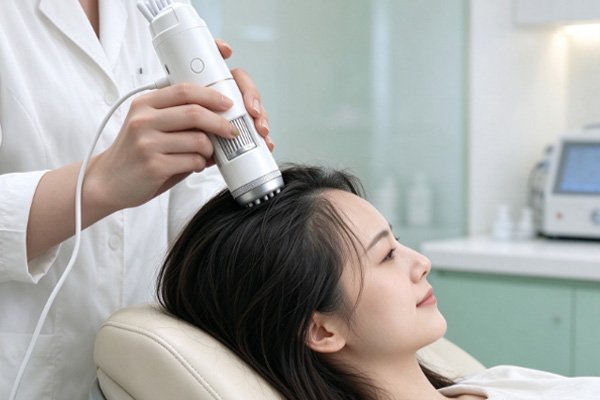
A USB hair analyzer is a scalp observation tool that connects to a computer or other compatible display device through a USB interface. It is typically equipped with a macro lens, LED lighting, and image capture functions, allowing users to observe visible features of the scalp surface, follicular openings, hair roots, and hair strands. As a key component responsible for image acquisition, the cleanliness of the lens directly affects image clarity. Dust, fingerprints, oil, and residue from skin care products may cause blurry images, localized reflections, or difficulty identifying details when they accumulate on the lens surface, making scalp observation less convenient. The lens of a USB hair analyzer generally requires gentle and standardized cleaning methods. Before cleaning, turn off the device and disconnect the USB cable, then check the lens surface for dust, oil, or other residue according to the product instructions.
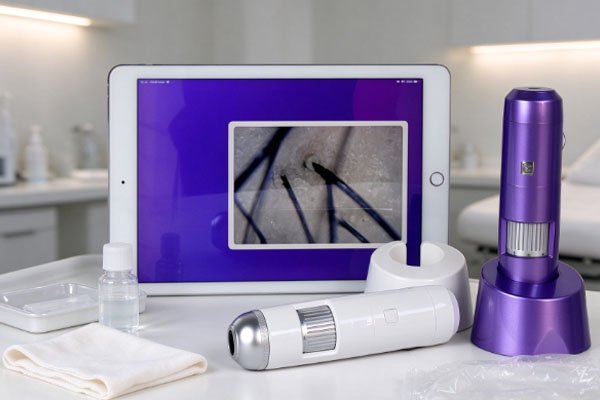
For light dust, use cleaning tools designed for optical lenses. For fingerprints or oil, use lens cleaning products approved by the manufacturer. Avoid touching the lens directly with your hands, and do not use alcohol, strong solvents, or ordinary paper tissues to wipe the lens indiscriminately. If the USB hair analyzer is used in a beauty clinic, scalp care center, or shared examination environment, it is also necessary to distinguish between cleaning the optical surface and maintaining the hygiene of probe contact areas. These components may have different materials and cleaning requirements, so the same disinfection method should not be applied indiscriminately to both. Proper cleaning and maintenance help preserve image quality, reduce lens wear, and extend the device’s normal service life.
Proper Cleaning Methods for a USB Hair Analyzer Lens
Lens cleaning should minimize particle friction and prevent cleaning products from damaging the optical surface. Different USB hair analyzer models may use different lens materials, surface coatings, and protective structures. Therefore, always prioritize the maintenance instructions provided by the manufacturer rather than directly applying every cleaning method used for digital cameras or other optical devices.
Turn Off the Device and Inspect the Lens Before Cleaning
Before cleaning, turn off the USB hair analyzer and disconnect it from the computer or other display device. This reduces the risk of accidentally pressing operating buttons, pulling the cable, or causing other problems during cleaning. Then inspect the lens surface to determine whether the contamination consists of dust, fingerprints, or oil residue. Clean the lens in a well-lit environment, avoid touching it with sharp tools, and do not wipe it directly with your fingers.
Select Cleaning Tools According to the Type of Contamination
Different types of contamination require different treatment methods, and excessive force should be avoided during cleaning. In particular, when fine dust is present on the lens surface, repeatedly wiping it with a cloth may cause the particles to rub against the surface and create tiny scratches.
Dust removal: Use a blower designed for optical lenses or a soft lens cleaning brush to remove loose particles first.
Fingerprints and oil: Use a lens cleaning solution approved by the manufacturer and a dedicated optical lens cleaning cloth, following the product instructions and cleaning gently.
Stubborn residue: If the contamination is difficult to remove, consult the device maintenance instructions and contact the supplier or a professional repair technician if necessary. Do not use blades, hard cotton swabs, or strong cleaning agents.
During cleaning, prevent liquids from dripping into lens gaps, the inside of the probe, or the USB port. Even if the product has a certain level of protection, this does not mean it is suitable for direct rinsing or immersion.
Daily Maintenance Requirements for a USB Hair Analyzer Lens
Lens maintenance involves more than removing dirt. It also includes preventing impacts, reducing unnecessary friction, and maintaining a suitable storage environment. By conducting simple inspections before and after use and promptly removing surface contamination, users can reduce the difficulty of cleaning residue that has accumulated over time.
Establish Inspection Habits Before and After Use
Before each use, check the lens for dust, fingerprints, or visible stains, then turn on the device to view the live image. If the image appears blurry or reflective, do not immediately assume that the lens is damaged. First, check lens cleanliness, focus, and lighting settings. After the examination, clean the relevant components according to the device instructions and confirm that no obvious residue remains on the lens surface. For devices frequently used for scalp observation, include inspection and cleaning in the daily operating procedure to avoid continuing image capture when the lens is visibly contaminated.
Protect the Device and Cable During Storage
Store the USB hair analyzer in a dry, clean, and relatively dust-free environment. Avoid prolonged exposure to humid areas, direct sunlight, or locations subject to significant temperature fluctuations.
Lens protection: When the device is not in use, install the lens cap according to the device design to prevent the lens from coming into direct contact with desks or other objects.
Cable management: Avoid excessive bending, pulling, or twisting when storing the USB cable to reduce the risk of loose connections or damage to internal wires.
Device storage: Place the device in a clean storage case or designated location. Do not store it together with sharp tools such as scissors or tweezers.
If the device will be stored for an extended period, clean it and inspect its exterior before putting it away under the conditions recommended by the manufacturer. Do not install the protective cap while cleaning solution remains on the lens or the device has not yet dried.
Lens Cleaning and Hygiene Management When the Device Is Shared
When a USB hair analyzer is used in a beauty clinic, scalp care center, or another shared environment, hygiene management of probe contact areas is just as important as keeping the optical lens clean. Cleaning the lens surface primarily maintains image quality, while cleaning or disinfecting contact areas helps reduce the risk of contamination transmission.
Distinguish Between the Optical Lens and Probe Contact Areas
Some devices have a protective cover or contact structure at the front of the lens, while others use a non-contact observation design. Different components may be made of different materials and may vary in their resistance to cleaning agents and disinfectants. Operators should consult the manual to confirm which components can be wiped, which can be treated with specified disinfectants, and whether disposable protective accessories need to be replaced. Do not apply a disinfectant directly to the lens or its optical coating simply because it is suitable for the device housing.
Avoid Lens Damage Caused by Improper Disinfection
Inappropriate cleaning methods may damage lens coatings, discolor plastic components, accelerate the aging of seals, or allow liquids to enter the probe. In particular, spraying alcohol, chlorine-based disinfectants, or other chemical products directly onto the lens may create unnecessary risks. When the device is shared by multiple users, follow the manufacturer’s specified cleaning and disinfection procedures. For non-contact lenses that do not directly touch the skin, prioritize keeping the optical surface clean. For probes that contact the scalp, treat the contact areas using the specified method and ensure that the device meets the required conditions before the next examination.
Frequently Asked Questions
Q1: Can Alcohol Be Used to Clean the Lens of a USB Hair Analyzer?
Answer: Certain components of some devices may permit the use of cleaning or disinfecting products at specified concentrations, but lens coatings and materials may not be resistant to certain solvents. Check the product instructions first to confirm which cleaning products are permitted. Do not spray alcohol directly onto the lens.
Q2: What Should I Do if the Image Remains Blurry After Cleaning the Lens?
Answer: First, check whether any residue remains on the lens, then inspect the focus, magnification, light source, and device connection. If the lens surface is clean but the image remains blurry, try refocusing the lens or checking the software settings according to the manual. If scratches, internal fogging, or persistent abnormalities are present, contact the supplier or a professional repair technician. Do not disassemble the lens yourself.
Q3: Does a USB Hair Analyzer Need to Be Cleaned After Every Use?
Answer: It is recommended to inspect the lens after every use and clean it according to the level of contamination and the manufacturer’s requirements. If the device is shared by multiple users, the probe contact areas should also be treated according to the specified procedures. Optical surfaces without visible contamination do not need to be wiped forcefully or repeatedly, as this may increase the risk of lens wear.
Q4: How Can I Tell Whether the Lens Needs to Be Replaced?
Answer: If the image remains consistently blurry after proper cleaning, correct focusing, and parameter checks, and the lens shows scratches, coating damage, or internal contamination, further inspection is necessary. Whether the lens should be replaced depends on the device structure and repair assessment. If the lens is integrated into a probe assembly, the supplier will generally need to confirm the appropriate repair or replacement solution.
Cleaning and maintaining the lens of a USB hair analyzer should focus on protecting the optical surface, preserving image clarity, and ensuring hygienic use. Before and after daily use, inspect the lens for dust, fingerprints, and oil residue, and select appropriate optical cleaning tools according to the type of contamination. During cleaning, avoid friction from hard objects, liquid penetration, and contact with unapproved chemical products. For applications involving long-term scalp observation and image recording, stable image quality and standardized maintenance procedures are equally important. Proper cleaning, appropriate storage, and regular inspection can reduce common lens contamination problems and help keep the device in good working condition for routine scalp observation.