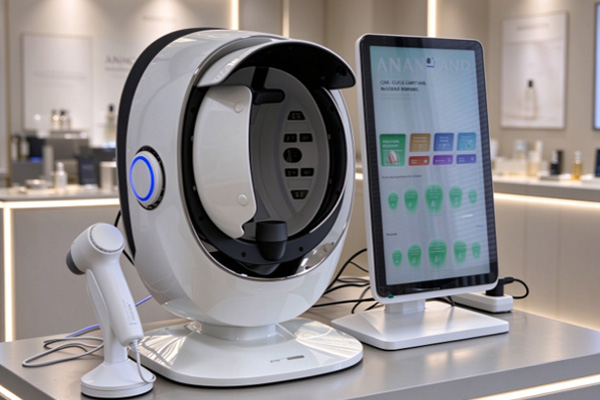
Skin analyzers use image capture and data processing to help beauty clinics understand facial skin characteristics. Image analysis focuses on identifying image features and extracting relevant data, while marked reports present the identified results through annotated areas and data descriptions, making them easier for practitioners to review and explain. Understanding the roles of these two functions helps beauty clinics evaluate equipment practicality, optimize testing workflows, and provide clients with clearer skin analysis services.
What Is Image Analysis in a Skin Analyzer?
Image analysis is an important processing stage in skin assessment. The device uses image recognition and algorithms to extract relevant features from captured images, providing a data foundation for the test results.
Main Functions of Image Analysis
Image analysis focuses on identifying and processing skin features in images. The specific functions depend on the device configuration.
- Skin Feature Recognition: Analyzes visible skin characteristics, such as pigmentation spots, pores, and wrinkles, according to the device’s supported functions.
- Data Extraction: Processes identified regions to generate measurements such as area, quantity, or relevant scores.
- Regional Comparison: Compares image features across different facial areas to help assess the distribution of skin characteristics.
The primary purpose of image analysis is to extract useful information from captured images and provide a basis for presenting the results.
Characteristics of Image Analysis Results
After processing, a device may produce image features, quantitative data, or analytical scores to help practitioners understand the assessment results.
- Image Information: Preserves the overall appearance and local details, making specific areas easier to examine.
- Quantitative Results: Converts selected image features into numerical values or scores for recordkeeping and subsequent comparison.
- Limitations: Image clarity, lighting conditions, and algorithm rules may affect recognition results. Analytical data cannot directly replace a medical diagnosis.
Understanding the scope and limitations of these results helps practitioners interpret the data appropriately.
What Is a Marked Report in a Skin Analyzer?
A marked report presents key areas identified through image analysis and organizes relevant data into an easy-to-read format, helping practitioners locate and explain specific skin features.
Main Functions of Marked Reports
Marked reports connect analytical results with specific images, making the assessment information more intuitive.
- Area Annotation: Uses colors, outlines, or symbols to highlight specific regions and show where features have been identified.
- Data Association: Links marked areas with corresponding measurements, quantities, or scores to make the results easier to understand.
- Information Summary: Combines images, indicators, and written explanations into a report according to the device’s functions.
The main purpose of a marked report is to present and explain analytical results rather than independently perform all image recognition and calculations.
Key Points for Reading Marked Reports
Reports should be interpreted alongside the original images and indicator descriptions. Avoid judging skin conditions based solely on colors or symbols. Check the meanings of different colors, outlines, and symbols, compare marked areas with the original images, and review indicator definitions to understand the scoring ranges. Individual values should not automatically be interpreted as measures of skin problem severity. Understanding the relationship between annotations and data improves report readability and explanation efficiency.
What Are the Differences Between Image Analysis and Marked Reports?
Image analysis and marked reports are closely related but serve different purposes. Image analysis focuses on information processing, while marked reports emphasize result presentation. Together, they form an integrated assessment workflow.
Differences in Core Functions and Presentation
In the assessment workflow, image analysis extracts features, while marked reports organize the relevant information into a more understandable format.
- Image Analysis: Identifies image features, processes relevant information, and generates analytical data.
- Marked Reports: Annotates key areas, links relevant indicators, and presents assessment results in an organized format.
- Practical Use: Image analysis results help practitioners understand the identified features, while marked reports are more convenient for reviewing, explaining, and saving the results.
These two functions work together to support both data processing and result presentation.
Different Applications in Beauty Services
Both functions support different stages of skin assessment, client communication, and follow-up recordkeeping.
- Assessment: Uses image analysis data to understand the skin characteristics identified by the device.
- Client Communication: Uses marked reports to highlight key areas, helping clients understand the assessment more clearly.
- Progress Tracking: Saves images and reports for future reference. Testing conditions should remain as consistent as possible when comparing results over time.
Using both functions appropriately helps make assessment workflows clearer and improves communication with clients.
How to Choose a Skin Analyzer with Image Analysis and Marked Report Functions?
When purchasing equipment, beauty clinics should evaluate not only the visual presentation of reports but also analytical capabilities, data display, and daily management functions to ensure the device meets their business needs.
Evaluate Analytical Functions and Report Quality
The device’s analytical capabilities determine the information it can provide, while report quality affects how efficiently practitioners can review and explain the results.
- Verify Analysis Parameters: Check the range of skin features the device can identify and confirm that it matches the clinic’s service requirements.
- Check Annotation Quality: Ensure that marked areas correspond clearly to the original images, making verification easier.
- Review Indicator Definitions: Confirm that report data and scores are clearly explained to reduce interpretation errors.
Matching analytical functions with clear report presentation helps the device meet practical assessment needs.
Prioritize Workflow Efficiency and Data Management
Equipment workflows and recordkeeping functions affect daily service efficiency and ongoing client management. Review the image capture, analysis, and report-generation steps to assess ease of use. Depending on business requirements, check for image storage, historical report retrieval, and progress comparison functions. Also review software training, maintenance requirements, and ongoing technical support. Evaluating analytical performance, report practicality, and management capabilities helps clinics choose equipment suited to long-term operation.
Image analysis and marked reports serve distinct but complementary purposes in a skin analyzer. Image analysis identifies skin features and extracts data, while marked reports highlight key areas, organize indicators, and present the results. When selecting equipment, beauty clinics should focus on analytical functions, annotation clarity, report readability, and client data management to make assessment results easier to understand, communicate, and track. Guangzhou Cosnext Technology Co.;Ltd provides product and technical solution consultations for beauty equipment buyers, helping them explore skin analyzer configurations suited to their operational needs.